CraftyBase & spreadsheet migration
Start with the stock
you already have.
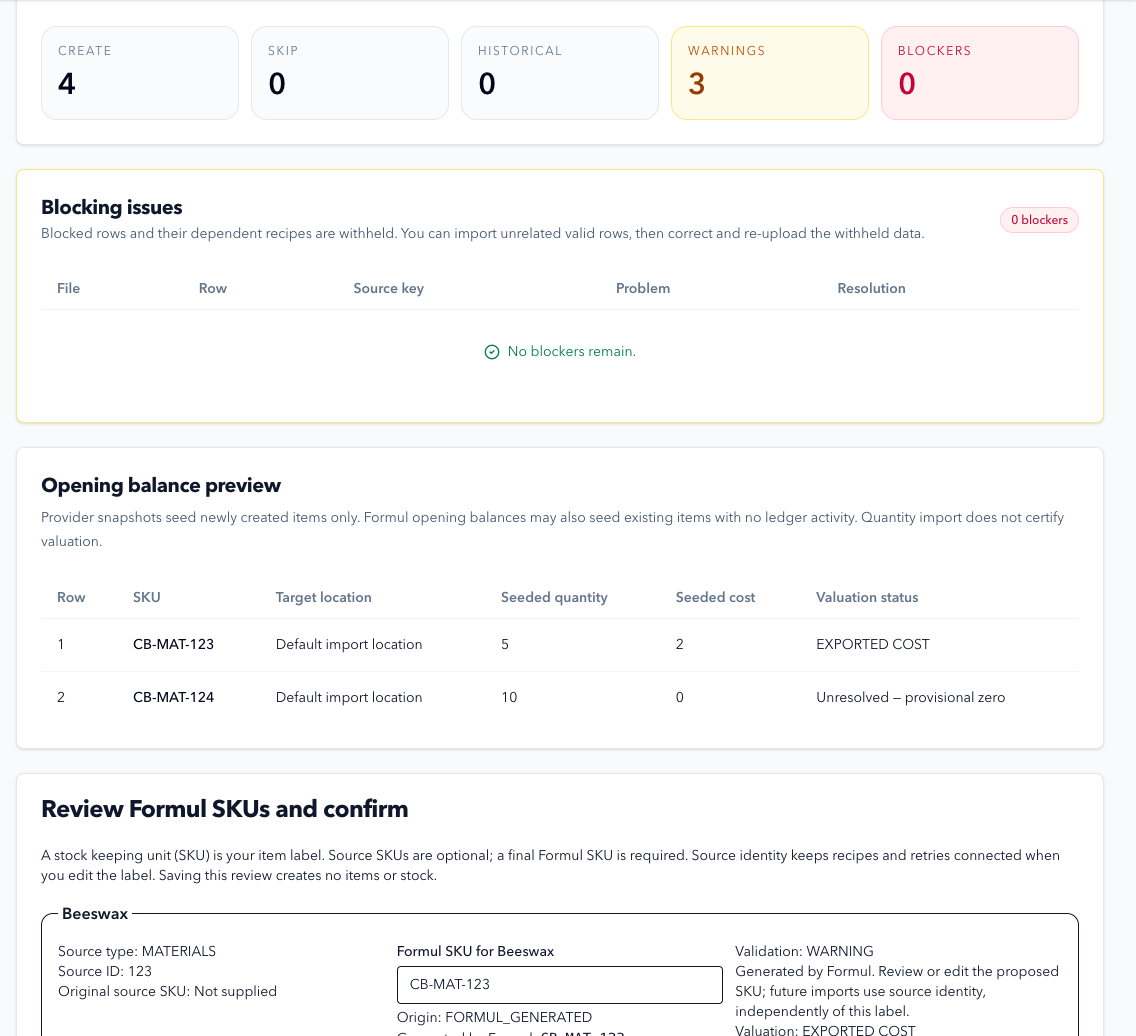
Moving systems starts with checking your records. Bring supported snapshots into Formul, review the problems and compare your opening stock before recording new work.
180 days free. No card. Then $19/month.
How it works in Formul
A checked starting point,
not a missing history.
Read the migration guideAsk us to review your files- 01
Prepare
Keep the original exports.
Save your source files and transaction history. We’ll confirm which files and fields the importer supports before enabling migration for your workspace.
- 02
Review
Check each file before importing.
Upload qualified files. Review blocked rows, warnings and proposed item codes. Check opening quantities and how each cost was obtained.
- 03
Import
Keep the results for each row.
Execute the reviewed run, then inspect created, skipped and failed rows. Correct withheld data in a new run rather than guessing what made it across.
- 04
Compare
Confirm stock and value separately.
Compare quantities with the source and investigate provisional or unresolved costs. A quantity import alone does not certify your stock valuation.
Solo Maker
Time to get
your stock in order.
Inventory, purchasing, formulas, production, costing and sales orders in one workspace.
Questions before you start? Talk to us$19 / month
After your 180-day free trial.
One user. No card needed to start.
180 days free. No card. Then $19/month.